Choosing Between AI-Assisted Development and Traditional Coding for Your Next Small Workplace Tool
Why the question matters
Every team has a pain point that a small piece of software could fix - a script that renames files a certain way, a dashboard that pulls data from three spreadsheets, or a simple form that logs requests. Until recently, building even a modest tool meant either writing code from scratch or paying someone else to do it. That put many useful applications out of reach for professionals who are not full-time developers.
Now a different option exists. Generative AI assistants can generate, explain, and debug code more fluently than ever. A professional with a clear problem but no programming background can describe what they want in plain English and get back a working script. The question is whether that is a smarter route than learning enough traditional coding to build the tool yourself, or whether a hybrid approach makes the most sense. This article compares the two paths so you can decide which fits your situation.
What each approach looks like in practice
Traditional coding for a workplace tool means writing commands in a language such as Python, JavaScript, or SQL. You open an editor, type the logic line by line, test it, fix errors, and repeat until the thing works. The learning curve depends on your background, but you end up understanding exactly what the code does and why.
AI-assisted development flips that process. You describe the tool you need - "a script that reads a CSV, removes duplicate rows, and emails a summary to me" - and the AI generates the code. You may need to tweak the prompt, copy the output into an editor, and test it. If it breaks, you paste the error message back to the AI and ask it to fix the problem. You are still in control, but the AI does most of the heavy lifting of syntax and logic.
Many professionals who take an AI assisted app development course discover that the real skill is not typing code but describing the problem precisely. A vague prompt produces a vague result; a structured, detailed prompt produces something close to what you need. That shift - from writing instructions for a machine to writing instructions for an AI that writes instructions for a machine - changes the kind of expertise you need.
When traditional coding still wins
There are situations where rolling up your sleeves and learning the code pays off. If the tool handles sensitive data - employee salaries, medical records, customer financial information - you may want full control over every line. AI-generated code can contain subtle bugs or logic that works most of the time but fails on edge cases. If you cannot audit the code yourself, you are trusting the AI to get everything right. A traditional approach forces you to understand the data flow, which reduces the risk of accidental exposure or corruption.
Another case is when the tool needs to interact with existing systems in a precise way. Your company might use a legacy database with unusual field names, a custom API, or a file format that is not common. AI models are trained on public code, so they handle standard libraries well but can struggle with idiosyncratic internal systems. Writing the integration code yourself, or at least having a developer do it, gives you direct control over compatibility.
Long-term maintenance is also a factor. If a tool is meant to be used for years, you or a colleague will eventually need to modify it. Code you wrote yourself is easier to read and change because you understand the reasoning behind it. AI-generated code often lacks comments, uses inconsistent naming, or solves a problem in a roundabout way. Six months later, deciphering it can be as hard as writing it from scratch.
When AI-assisted development shines
For a one-off tool that solves a specific problem and will not be maintained, AI assistance is often faster and more practical. A manager who needs to merge a few spreadsheets before a deadline does not need to learn Python loops and list comprehensions. They can describe the task in natural language, get a working script in minutes, and run it. If the script works, the job is done. If it does not, they can iterate with the AI until it does. The time saved can be significant.
Another strength is prototyping. If you are not sure whether a tool is worth building at all, you can ask an AI to generate a rough version and test it with real data. A few rounds of prompt refinement can give you something that demonstrates the concept. If the prototype proves useful, you can invest time in a more robust version later, possibly with traditional coding. If it does not, you have lost only a small amount of effort.
Professionals who attend a course like the one offered by United Ceres College often find that the combination of AI assistance and some fundamental coding knowledge is the sweet spot. You do not need to become a software engineer, but understanding basic concepts - variables, loops, conditional statements, functions - helps you write better prompts and catch obvious errors. The AI handles the syntax; you handle the logic and the domain knowledge.
Comparing the learning curves
Traditional coding has a steeper initial climb. You must learn syntax, debugging techniques, and how to read error messages. The payoff is that the skills are transferable. Once you know how to write a script that reads a CSV, you can apply that knowledge to dozens of similar problems. Over time, your speed increases because you build a personal library of reusable code snippets and patterns.

AI-assisted development has a gentler start. You can produce something useful on the first day. But the skills involved - prompt engineering, evaluating outputs, iterating with the AI - are still new and evolving. A prompt that works today may not work as well after the AI model is updated. Relying entirely on AI assistance means you depend on an external system that changes without notice. You also miss the deeper understanding that comes from writing code yourself, which can make it harder to debug complex problems or optimise performance.
Practical factors to weigh
Consider how often you will build tools. If the answer is once a year, AI assistance is likely the better route. You can get the job done without investing time in learning a skill you will rarely use. If you find yourself automating tasks every month, the upfront investment in traditional coding pays for itself. You become faster over time and less dependent on an AI service that may have usage limits or costs.
Consider the complexity of the tool. A simple script that transforms data might be a ten-line Python function. An AI can generate that reliably. A tool that coordinates several systems, handles errors gracefully, and logs its activity is harder for an AI to get right in one shot. You may end up spending more time debugging AI-generated code than you would writing it yourself.
Consider your team environment. If colleagues are comfortable with code, a traditional approach lets them review and contribute. If the team is all non-technical, a tool built with AI assistance might be harder for anyone else to understand or modify. You become the sole point of failure.
Where a short course fits in
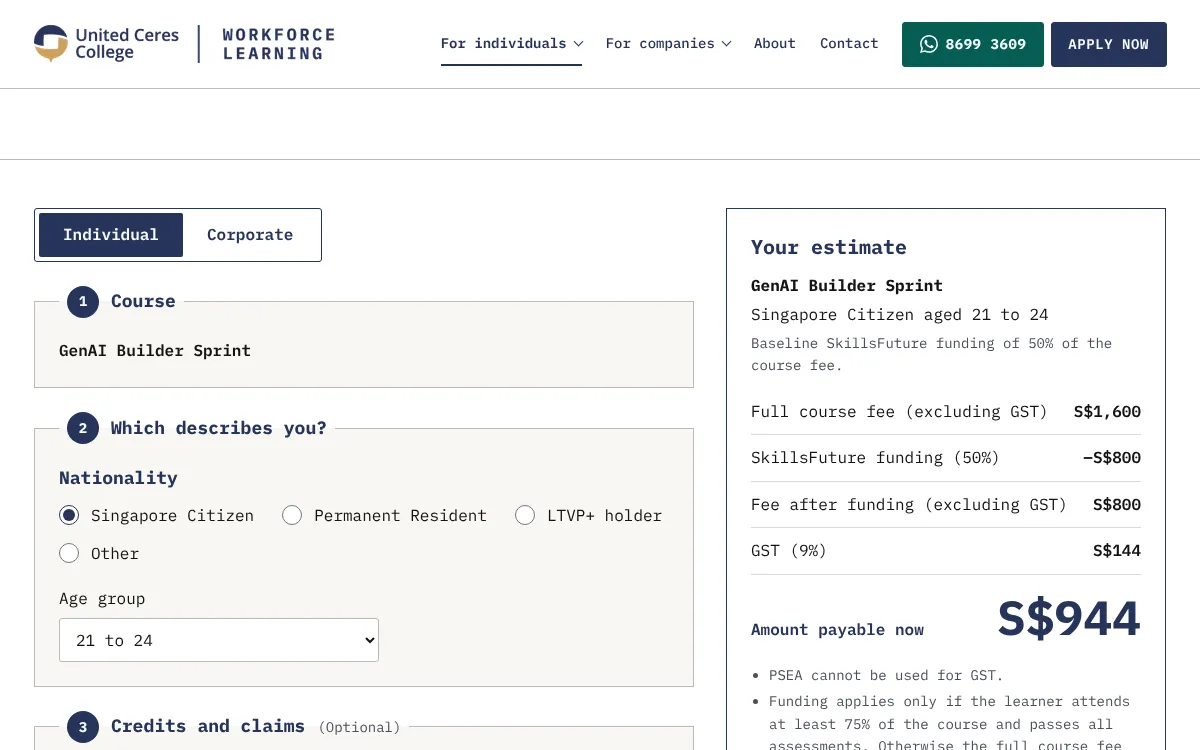
A structured programme can give you a practical sense of both approaches without requiring weeks of study. The AI assisted app development course at United Ceres College, for instance, runs over two days and focuses on building and deploying a simple generative AI application. That kind of format is useful for a professional who wants to see what AI-assisted development feels like in a guided setting, with an instructor to answer questions and a clear outcome at the end. You come away with a working application and a better sense of whether the approach suits your daily work.
Courses like this also help you calibrate your expectations. You learn what AI can do well and where it still stumbles. That knowledge makes you a smarter user of AI tools, whether you end up using them every day or only for occasional projects.
Making your choice
There is no single right answer. The best approach depends on your problem, your timeline, your team, and how much you want to learn. If you need a tool fast and do not plan to maintain it, AI-assisted development is worth trying. If you want control, security, and long-term maintainability, traditional coding gives you that confidence. For many people, the answer is a blend: learn enough coding to understand what the AI is doing, and use the AI to speed up the parts that would otherwise take hours of typing and debugging.
The professionals who get the most out of either approach are the ones who stay curious. They ask why the AI generated a particular line. They test edge cases. They keep a small notebook of code patterns they have seen work. And when a tool needs to be reliable, they take the time to understand it thoroughly. That attitude, more than the choice of method, is what turns a quick script into a genuinely useful workplace tool.
United Ceres College on social media
 Twitter
 LinkedIn
 Facebook
 Instagram
 YouTube